

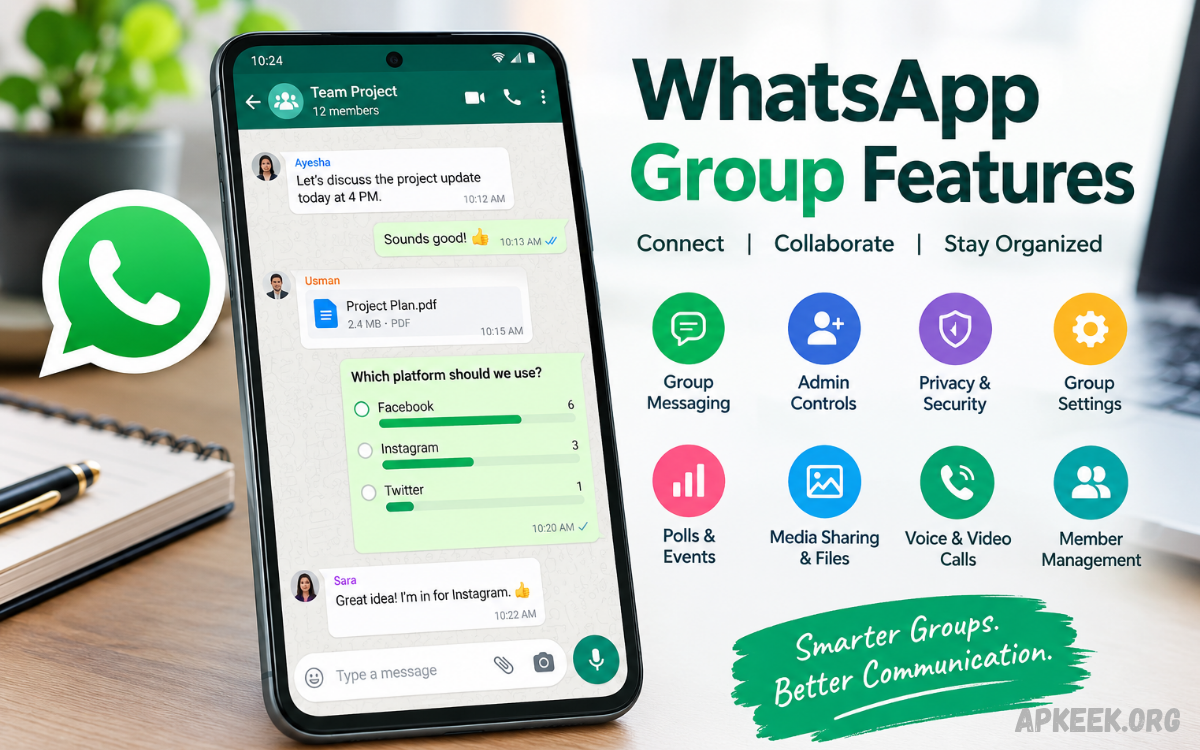
WhatsApp Group Features make communication easier for families, friends, students, businesses, and online communities. Group chats let multiple people exchange messages, share photos and videos, distribute documents, and coordinate activities in one conversation.
Modern WhatsApp groups offer much more than basic messaging. Administrators can manage membership, control permissions, organize discussions, and maintain a safer communication environment.
What Are WhatsApp Group Features?
WhatsApp Group Features are tools that support communication among multiple participants in a shared chat. Members can exchange text messages, images, videos, voice notes, links, contact information, and documents.
Group functionality also includes administrative controls and communication options that help organize conversations. Depending on the app version, device, and group configuration, users may access polls, events, voice chats, disappearing messages, and other collaboration tools.
Group Messaging and Real-Time Communication
Group messaging is the foundation of WhatsApp Group Features. Members can send announcements, ask questions, share opinions, and respond to conversations without opening separate chats.
WhatsApp also supports message replies, reactions, and mentions in group conversations. Replying to a particular message helps maintain context, while reactions provide quick feedback without creating additional messages.
WhatsApp Group Creation and Invitation Links
Creating a WhatsApp group is straightforward. Open WhatsApp, select the option to create a new group, choose eligible contacts, enter a group name, and confirm. Depending on the interface, users can also add a profile image and a group description to explain the conversation’s purpose.
Invitation links provide another convenient way to build a group. Administrators can share an invitation link with people who want to join, avoiding the need to add every participant manually.
WhatsApp Group Admin Controls
Administrator controls are among WhatsApp Group’s most valuable features. Group admins can manage participants, update group information, adjust permissions, and remove members when necessary. These controls help maintain order, especially in groups with many participants or frequent conversations.
Administrators can also set who can edit group details or send messages, depending on the available settings. Restricting certain actions can prevent unwanted changes and reduce spam.
Group Privacy and Security Settings
Privacy is an essential consideration when joining or managing WhatsApp groups. WhatsApp provides privacy settings that help users control who can add them to groups.
Group members should also understand that messages and shared files may contain personal information. Although WhatsApp uses end-to-end encryption for personal messages and calls, encryption does not prevent recipients from copying, forwarding, photographing, or sharing content outside the conversation.
Group Description and Customization
A group description explains the conversation’s purpose and helps members understand its rules. Administrators can use this space to publish meeting details, class schedules, business information, community guidelines, or contact instructions.
WhatsApp groups can also use profile images to establish a recognizable identity. Schools might use a class logo, businesses might choose a company image, and families might select a shared photograph.
Message Reactions, Replies, and Mentions
Message reactions let members respond quickly without sending a separate message. Participants can react with supported emojis to acknowledge an announcement, express appreciation, or indicate agreement. This approach reduces repetitive responses and helps keep conversations readable.
Replying directly to a message is useful when several topics are being discussed simultaneously. The reply references the original message, helping participants understand which question or comment you’re addressing.
WhatsApp Group Polls
Polls make group decisions easier by letting participants choose from available options. A group can use a poll to choose a meeting time, select a destination, decide on a project topic, or gather preferences about an event. Poll results appear within the conversation, making collective decisions more transparent.
To create a poll, open the group chat, access the attachment or additional options menu, select the poll option, enter a question, and add answer choices. Available options may vary by device and app version.
WhatsApp Group Events
Group events help participants organize upcoming activities within a conversation. Depending on feature availability, members can create an event with details such as its name, date, time, and location or meeting information. Participants can respond to indicate whether they plan to attend, making coordination easier.
Events can support study sessions, team meetings, family gatherings, online classes, and community activities. Posting an event inside the relevant group keeps the information connected to the discussion.
Media Sharing and Document Exchange
WhatsApp groups support sharing photos, videos, documents, links, and other permitted attachments. This capability makes groups useful for exchanging class notes, business presentations, event photographs, product information, and project files.
Media quality and file limits depend on the attachment type, app version, and current platform restrictions. Users should consider storage use before repeatedly sharing large files.
Voice Messages and Voice Chats
Voice messages allow users to communicate without typing lengthy explanations. Members can record instructions, share updates, or explain complicated topics through audio.
WhatsApp also offers group voice-chat functionality in supported contexts. Unlike a conventional call that requires everyone to participate simultaneously, voice chats can provide a more flexible way for group members to join an ongoing conversation.
Group Video Calls
Group video calls allow multiple participants to communicate face-to-face through WhatsApp. They can be useful for family conversations, remote teamwork, study discussions, and informal meetings.
The maximum number of participants depends on WhatsApp’s current limits and the relevant calling configuration. Before starting a call, members should check their internet connection, microphone, camera, and surroundings.
Message Editing and Deletion
WhatsApp provides message-management options that help users correct mistakes. Editing allows a sender to fix certain errors in a recently sent message, while deletion options can remove a message from the sender’s chat or, when eligible, from participants’ chats.
These tools are particularly useful in active groups, where a mistaken date, incorrect instruction, or typing error may confuse many people. However, editing or deleting a message does not guarantee that nobody has already read or copied it.
Disappearing Messages
Disappearing messages allow eligible group conversations to automatically remove new messages after a selected duration. Supported durations and controls vary, and the setting may be managed based on the group’s permissions.
Disappearing messages should not be treated as a complete privacy solution. Recipients may save information, capture screenshots, copy text, or preserve content in other ways.
Group Notifications and Mute Settings
Busy WhatsApp groups can generate frequent notifications throughout the day. Mute settings allow users to reduce interruptions without leaving a conversation. This helps with large communities, promotional groups, study chats, and work discussions that stay active outside regular hours.
Users can also manage notification preferences and review unread messages when it suits them. Important groups may deserve different notification settings from casual conversations. A practical approach is to mute low-priority groups while keeping essential communications accessible, helping maintain concentration without completely disconnecting from useful information.
Search, Starred Messages, and Chat Organization
Search tools help members locate information within a group conversation. Instead of scrolling through hundreds of messages, users can search for keywords, dates, or relevant content using available search filters. This is especially useful for finding an address, meeting time, shared document, or previously discussed instruction.
Starred messages provide another way to preserve important information for quick access. Members can star selected messages, while chat organization options can help separate important conversations from less urgent ones. These tools work best when users save genuinely useful information rather than marking every message, which would reduce the value of prioritization.
WhatsApp Communities and Connected Groups
WhatsApp Communities help organize related groups under a broader structure. For example, a school community might contain separate groups for different classes, parents, teachers, and announcements. A business or local organization could use a similar structure to separate departments, teams, or member discussions.
Community tools reduce the confusion that can arise when every discussion happens in one large group. Administrators can direct information to the right audience, while members can join groups that match their interests or responsibilities. Available community features and administrative permissions depend on the current WhatsApp configuration.
Group Member Management
Member management helps administrators maintain an appropriate and relevant participant list. Admins can review membership, remove accounts when required, and manage invitations according to the group’s rules. This is particularly important for groups involving customers, public communities, educational activities, or large numbers of participants.
Administrators should establish clear criteria for joining and remaining in the group. Removing spam accounts, addressing abusive behavior, and reviewing invitation links can improve the overall experience. At the same time, moderation decisions should be consistent and fair so that legitimate members understand how the group is managed.
WhatsApp Group Limits and Participant Capacity
WhatsApp groups support many participants, making them suitable for communities and collaborative projects. However, the maximum membership limit can change as WhatsApp updates its services.
Large groups may require more structured communication than small family chats. Clear rules, dedicated announcement channels (where available), and appropriate moderation can keep discussions easy to follow.
Read Also: WhatsApp Messenger: Features, Privacy, and Messaging Guide
WhatsApp Group Features for Businesses
Businesses use WhatsApp groups to coordinate internal tasks, exchange updates, plan campaigns, and communicate with selected teams. A group can provide a convenient place to discuss deadlines, share approved materials, and clarify responsibilities. Smaller, purpose-specific groups often work better than one conversation containing every employee and every topic.
Business users should distinguish between internal team communication and customer messaging. Customer support, marketing, and large-scale business communication may be better handled through appropriate WhatsApp Business tools, rather than adding customers to a group without their consent. Respecting privacy and obtaining permission helps protect customer relationships and brand reputation.
WhatsApp Group Features for Students and Teachers
Students can use group chats to exchange notes, discuss assignments, coordinate presentations, and share exam reminders. Teachers can use appropriate groups to share schedules, provide learning resources, and answer general questions. These uses can improve collaboration when participants follow clear communication guidelines.
Educational groups should establish boundaries around message timing, relevant content, and personal information. Students should verify shared answers and learning materials instead of assuming every forwarded message is accurate. Teachers and administrators should also consider institutional privacy policies, especially when groups include minors or sensitive academic information.
WhatsApp Group Safety and Spam Prevention
Spam prevention is important for groups that accept many participants or use invitation links. Administrators should review unexpected membership changes, remove promotional spam, and avoid distributing invitation links publicly without a clear reason. Members should be cautious when unfamiliar accounts request money, personal information, or urgent action.
Suspicious links, impersonation attempts, and fraudulent offers can appear even in familiar conversations if an account is compromised. Verify unusual requests through another trusted channel before taking action. If a member behaves abusively or shares harmful content, use the available reporting and blocking tools where appropriate and notify the group administrators.
How to Use WhatsApp Group Features Effectively
Effective WhatsApp group management starts with defining the group’s purpose. Choose a clear name, add a useful description, set appropriate permissions, and explain the rules to new participants. For groups with frequent activity, assign trusted administrators and establish a process for sharing important announcements.
When available, members should use replies to maintain context, polls to gather preferences, and events to coordinate activities. Muting nonessential notifications and starring important messages can improve organization. Regular moderation, respectful communication, and thoughtful sharing make group conversations more productive for everyone.
Common WhatsApp Group Problems and Solutions
Some users may not be able to join a group through an invitation link, add a participant, or access a particular feature. Possible causes include expired or reset invitation links, group membership restrictions, participant limits, outdated app versions, or temporary connectivity problems. Checking the specific error message can help identify the appropriate solution.
If a feature is missing, update WhatsApp through the official app store and review the group’s permissions. Ask an administrator to confirm whether the relevant action is allowed. Avoid downloading modified WhatsApp applications from unofficial sources, because they can expose accounts and personal information to additional security risks.
Future of WhatsApp Group Features
Group communication continues to evolve as messaging platforms introduce improved administration, privacy options, collaboration tools, and community management capabilities.
For the most accurate information, users should check official WhatsApp announcements and the Help Center. Feature descriptions published by third-party websites may refer to older versions or limited testing programs.
Frequently Asked Questions
What are WhatsApp Group Features?
WhatsApp Group Features include group messaging, media sharing, member management, administrator permissions, polls, events, reactions, voice chats, and other tools that support communication among multiple participants.
How do I create a WhatsApp group?
Open WhatsApp, select Create new group, choose participants, enter a group name, and confirm. The exact steps may differ slightly between Android, iPhone, and other supported interfaces.
Can I control who adds me to WhatsApp groups?
Yes. WhatsApp provides group privacy settings that let users control who can add them directly. Depending on the available options, you may restrict direct additions and require eligible contacts to send invitations instead.
What can a WhatsApp group admin do?
Administrators can manage members, control certain group permissions, update group information, manage invitations, and remove participants when necessary. Available controls depend on the group’s settings and current app functionality.
Can WhatsApp groups conduct polls?
Yes. Supported groups can use polls to collect preferences and help members make decisions. Users can create a question, add answer options, and allow participants to vote.
What are WhatsApp disappearing messages?
Disappearing messages automatically remove eligible new messages after a selected duration. They help manage chat history but do not prevent recipients from copying, capturing, or preserving information separately.
Can I make video calls in WhatsApp groups?
Yes. WhatsApp supports group video calls, subject to current participant limits and calling availability. A stable internet connection, along with a working camera and microphone, helps improve call quality.
Are WhatsApp group messages private?
WhatsApp personal messages are protected by end-to-end encryption, but group members can still share content they receive outside the group. Users should avoid posting confidential information and carefully review group membership.
How can I reduce WhatsApp group notifications?
Open the relevant group, access its notification settings, and select an available mute option. You can also adjust general notification preferences to reduce interruptions from active conversations.
How can I keep a WhatsApp group safe?
Use appropriate administrator permissions, review invitation links, remove spam, establish clear rules, and avoid sharing sensitive information. Members should verify suspicious requests and report abusive or fraudulent activity when necessary.
Conclusion
WhatsApp Group Features provide practical tools for communication, collaboration, privacy management, and community organization.
The best results come from combining useful features with responsible group management. Keep WhatsApp updated, configure privacy settings carefully, establish clear rules, and share information thoughtfully.
