

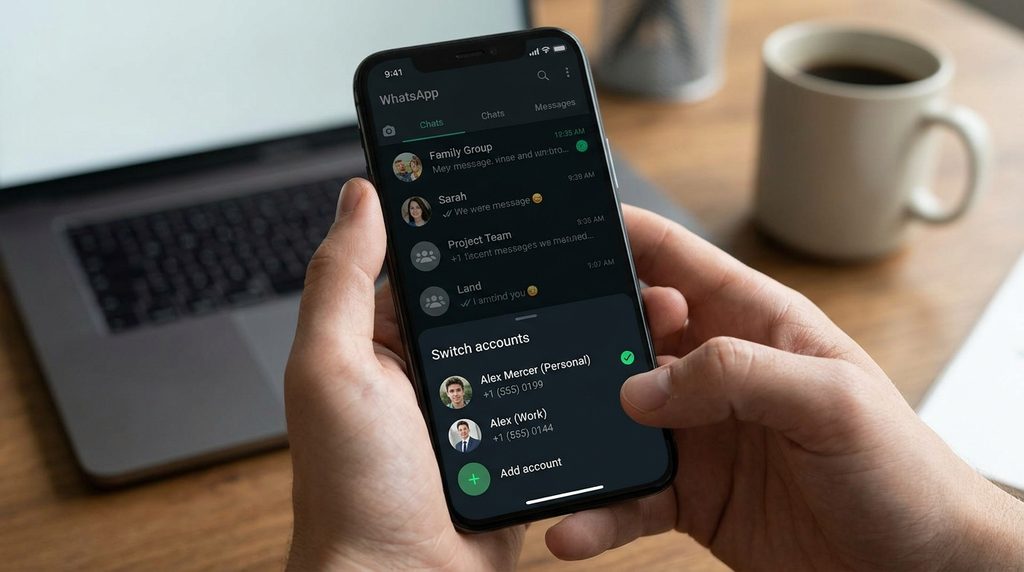
WhatsApp Multiple Accounts offers a convenient way to manage personal and professional conversations on one smartphone. Users can maintain separate profiles without carrying two devices.
This feature helps people organize daily communication, manage business messages, and keep personal chats separate. Switching between accounts makes messaging more flexible and efficient.
What Is WhatsApp Multiple Accounts?
WhatsApp Multiple Accounts lets users run two WhatsApp accounts on one smartphone. Each account maintains separate conversations, notifications, profile details, and privacy settings.
This option provides better communication management for people with different messaging needs. Users can maintain personal and business profiles without mixing important conversations.
How WhatsApp Multiple Accounts Works
WhatsApp allows users to add another account through its account settings. Each account requires a separate phone number and access to the verification process.
After adding another profile, users can switch between accounts directly within the application. Messages, contacts, notifications, and account preferences stay tied to their respective profiles.
Benefits of Using WhatsApp Multiple Accounts
Separate Personal and Professional Conversations
WhatsApp Multiple Accounts helps users maintain separate communication spaces. Personal messages remain separate from professional discussions, making daily communication easier to organize.
Business owners can manage customer inquiries through one profile while keeping family and friends on another. This arrangement supports better communication management.
Better Privacy Management
Separate accounts allow users to maintain different profile pictures, descriptions, and privacy preferences. Users can control how personal information appears to different audiences.
This arrangement helps reduce confusion between personal and professional contacts. It also provides greater flexibility when managing communication preferences.
Convenient Account Switching
Switching between WhatsApp accounts does not require repeatedly signing out. Users can move between profiles through the application’s account menu.
This feature saves time and makes communication more convenient. Users can check messages from different accounts without opening separate devices.
Improved Business Communication
Small business owners often receive customer messages throughout the day. A dedicated business account helps organize customer conversations separately from personal discussions.
WhatsApp Multiple Accounts makes managing these conversations easier. Users can maintain a professional communication environment while keeping personal interactions private.
How to Set Up WhatsApp Multiple Accounts
Setting up WhatsApp Multiple Accounts requires a compatible smartphone and two separate phone numbers. Users should also ensure they can access the numbers during verification.
The setup process is straightforward and does not require advanced technical knowledge. Follow the steps below to add another account.
Open WhatsApp Settings
Launch WhatsApp on your Android smartphone and open the settings menu. Tap the small arrow or account menu beside your profile information.
Look for the option to add another account. If you see the option, your app supports multiple accounts.
Add a Second Account
Select the Add Account option to begin the setup process. Enter the phone number associated with your second WhatsApp account.
Choose the appropriate country code before entering your phone number. Confirm the details to continue verifying your account.
Verify Your Phone Number
WhatsApp sends a verification code to the registered phone number. Enter the code to confirm ownership and activate the additional account.
Complete any remaining profile setup steps. You can add a profile picture, display name, and other account information.
Switch Between Accounts
After adding another account, open the account menu within WhatsApp settings. Select the profile you want to access.
WhatsApp switches to the selected account while keeping conversations associated with each profile. Repeat this process whenever you need another account.
WhatsApp Multiple Accounts on Android
Android users can access the official multiple-account feature through supported WhatsApp versions. Availability depends on app updates and device compatibility.
Users should install the latest official application version to access available features. Updated software also provides important security improvements and performance enhancements.
WhatsApp Multiple Accounts on iPhone
iPhone users can also access multiple-account functionality through supported WhatsApp versions. Feature availability may depend on the installed app version and regional rollout.
Users should check their WhatsApp settings for account management options. Keeping the application updated helps ensure access to the latest supported features.
WhatsApp Multiple Accounts vs WhatsApp Business
WhatsApp and WhatsApp Business serve different communication requirements. Regular WhatsApp focuses on everyday messaging, while WhatsApp Business provides additional tools for professional communication.
WhatsApp Multiple Accounts allows users to maintain separate profiles. WhatsApp Business adds features such as business profiles, product catalogs, automated greetings, and customer messaging tools.
Regular WhatsApp Features
Regular WhatsApp supports personal messaging, voice calls, video calls, group conversations, and media sharing. It provides essential communication tools for everyday users.
Personal accounts also include privacy settings, disappearing messages, chat backups, and security features. These options help users manage their conversations.
WhatsApp Business Features
WhatsApp Business includes professional tools designed for businesses and customer communication. Business profiles can display operating hours, descriptions, contact information, and product catalogs.
Automated greetings and away messages help businesses respond to customers. Labels also provide a convenient way to organize conversations.
Important Features of WhatsApp Multiple Accounts
Separate Chat Histories
Each WhatsApp account maintains its own chat history. Messages from one account do not automatically appear inside another account.
This separation makes it easier to organize personal conversations and business communication. Users can find important messages within the correct profile.
Independent Notification Settings
WhatsApp provides notification preferences for account management. Users can customize notification options to match their communication needs.
Separate notification settings help identify incoming messages from different profiles. This feature makes managing multiple conversations more convenient.
Individual Profile Information
Every account can have its own profile picture, name, and information. Users can create different identities for personal and professional communication.
This separation helps contacts recognize the correct account. It also supports a more organized messaging experience.
Account Privacy Controls
WhatsApp offers privacy controls for profile information, last seen status, online visibility, and other supported settings. Users can adjust these preferences separately for each account.
Reviewing privacy settings regularly helps protect personal information. Users should choose settings based on their communication needs.
How to Manage WhatsApp Multiple Accounts Effectively
Managing multiple accounts becomes easier when users follow a consistent communication routine. Keeping personal and professional profiles organized helps prevent unnecessary confusion.
Users should regularly review notifications, update privacy settings, and maintain separate communication habits. These practices support a cleaner messaging experience.
Keep Personal and Business Contacts Separate
Use one account for personal conversations and another for professional communication. This approach makes messages easier to identify and reduces unnecessary interruptions.
A dedicated business profile also helps customers recognize official communication. Clear profile information creates a more professional impression.
Customize Notification Preferences
Adjust notification preferences based on each account’s importance. Users can choose alert settings that suit personal and professional messages.
Managing notifications helps reduce distractions during work or personal activities. It also makes important conversations easier to recognize.
Organize Important Chats
WhatsApp provides chat pinning, archiving, and other organization tools. These features help users keep important conversations easy to access.
Business users can also use labels through WhatsApp Business. Organized conversations make customer communication easier to manage.
WhatsApp Multiple Accounts and Account Security
Account security remains important when using multiple WhatsApp profiles. Each account should have suitable security settings to protect conversations and personal information.
WhatsApp provides several security options, including two-step verification, encrypted messaging, and device management. Users should review these settings regularly.
Enable Two-Step Verification
Two-step verification adds another layer of security to a WhatsApp account. Users create a personal PIN for extra protection during account registration.
Choose a PIN that is difficult for others to guess. Keep recovery information updated to reduce account access problems.
Protect Verification Codes
Never share WhatsApp verification codes with unknown individuals. Scammers may request these codes to gain unauthorized access to accounts.
Always verify unexpected messages requesting sensitive account information. Official WhatsApp support does not require users to share verification codes through suspicious conversations.
Review Linked Devices
WhatsApp lets users connect additional devices through its linked-device feature. Reviewing connected devices helps identify unfamiliar sessions.
Remove devices you no longer recognize or use. Regular checks help maintain better control over account access.
Use Official WhatsApp Applications
Download WhatsApp through trusted application stores. Avoid unofficial modified versions that promise additional account management features.
Unofficial applications may introduce security and privacy risks. Official software provides a safer way to manage messaging accounts.
Common Problems With WhatsApp Multiple Accounts
Some users have trouble adding or managing multiple accounts. These problems can involve verification, notifications, application updates, or device compatibility.
Understanding common issues helps users identify suitable solutions. Most basic problems can be addressed through account settings and application maintenance.
Second Account Option Missing
The multiple-account option may not appear on every device or application version. Feature availability can depend on software updates and supported devices.
Update WhatsApp through the official application store. Restart the application and check account settings again.
Verification Code Not Received
Verification problems can occur because of incorrect phone numbers, network interruptions, or mobile service restrictions. Confirm the country code and phone number before requesting another code.
Ensure the SIM card can receive SMS messages or phone calls. Follow WhatsApp’s official verification instructions when additional assistance is required.
Notifications Not Working
Notification problems may result from device settings, battery restrictions, or application permissions. Check notification preferences for both WhatsApp accounts.
Review background activity permissions and ensure notifications are enabled. Restarting the application may also resolve temporary notification issues.
Read Also: How To Earn Money Sitting At Home in 2026
Account Switching Problems
Some users may experience delays while switching between profiles. Temporary application issues or outdated software can affect account performance.
Update WhatsApp and restart the device if account switching becomes unreliable. Avoid repeatedly removing and adding accounts without understanding the consequences.
WhatsApp Multiple Accounts for Business Owners
Business owners can benefit from maintaining separate personal and professional communication profiles. This arrangement helps establish clear communication boundaries.
A dedicated business account can handle customer questions, orders, and service requests. Personal conversations remain separate, making daily communication easier to manage.
Customer Communication Management
A separate business account creates a dedicated space for customer interactions. Business owners can respond to inquiries without mixing them with personal messages.
WhatsApp Business also provides useful communication tools. These features help businesses organize customer conversations and respond promptly.
Professional Brand Identity
Business profiles can display company names, descriptions, operating hours, and contact details. This information helps customers understand the services offered.
Maintaining accurate profile information builds trust. A professional account also makes communication more recognizable.
Better Work-Life Organization
Separating business and personal accounts helps establish communication boundaries. Users can prioritize professional messages during working hours.
Personal conversations remain accessible through another account. This approach supports better organization throughout the day.
WhatsApp Multiple Accounts for Students
Students often communicate with classmates, teachers, and family members through WhatsApp. Separate accounts can help organize academic and personal conversations.
One account can support educational communication, while another handles personal interactions. This arrangement makes important academic messages easier to locate.
Manage Study Groups
Students can use WhatsApp groups to discuss assignments, examinations, and educational activities. A dedicated account helps keep these conversations organized.
Separate profiles also reduce confusion between academic discussions and personal messages. Students can manage communication according to their daily schedules.
Share Educational Materials
WhatsApp supports document sharing, images, videos, and voice messages. Students can exchange notes and study materials through relevant conversations.
Keeping academic discussions organized helps students locate shared resources. Important messages can also be pinned for easier access.
Does WhatsApp Multiple Accounts Require Two SIM Cards?
WhatsApp Multiple Accounts requires separate phone numbers for separate accounts. However, users don’t necessarily need two physical SIM cards in one smartphone.
A second number may be available through another supported mobile connection or compatible service. The number must remain accessible for WhatsApp verification when required.
Can You Use WhatsApp Multiple Accounts Without Logging Out?
Yes, the official multiple-account feature lets users keep two accounts without repeatedly logging out. Users can switch between profiles through the account menu.
Each account retains its own conversations and profile information. This makes switching between personal and professional communication more convenient.
Can WhatsApp Multiple Accounts Receive Messages Simultaneously?
Multiple accounts can receive messages independently when connected and operating normally. Users can receive notifications from their different profiles.
Notification delivery may depend on internet connectivity, background permissions, and device settings. Keeping WhatsApp updated helps maintain reliable communication.
Is WhatsApp Multiple Accounts Safe?
Using the official WhatsApp multiple-account feature is a convenient way to manage separate messaging profiles. WhatsApp provides security protections designed to safeguard account communication.
Users should enable two-step verification and avoid sharing sensitive information. Downloading applications from trusted sources also helps reduce security risks.
Tips for a Better WhatsApp Multiple Accounts Experience
A few simple habits can improve the overall account management experience. Users should keep apps updated and review account settings regularly.
Keeping profiles organized, protecting verification codes, and managing notifications can make daily messaging easier. These practices also help prevent common account management problems.
Keep WhatsApp Updated
Application updates introduce improvements, bug fixes, and security enhancements. Regular updates help users access supported features and maintain application stability.
Enable automatic updates through the official application store when appropriate. Check available updates if a feature does not appear.
Maintain Separate Account Identities
Use different profile pictures and descriptions for personal and professional accounts. Clear account identities make switching between profiles easier.
Contacts can also recognize the correct profile more quickly. This reduces confusion during important conversations.
Check Privacy Settings Regularly
Review profile visibility, online status, group permissions, and linked devices. Adjust these settings according to your communication preferences.
Regular privacy checks help maintain better control over personal information. Users should also review security notifications carefully.
Avoid Unofficial Applications
Modified WhatsApp applications may advertise extra features or advanced customization. However, these applications can create security and privacy problems.
Use official WhatsApp applications to manage your account. Avoid sharing account information with unknown services.
Future of WhatsApp Multiple Accounts
Multiple-account functionality reflects changing communication habits. People increasingly use separate messaging profiles for personal, educational, and professional activities.
WhatsApp continues developing communication and privacy features. Future improvements may make account management more flexible and convenient.
Frequently Asked Questions
What Is WhatsApp Multiple Accounts?
WhatsApp Multiple Accounts allows users to maintain two separate WhatsApp profiles on one smartphone. Each account uses its own phone number and keeps conversations separate.
Can I Use Two WhatsApp Accounts on One Phone?
Yes, WhatsApp supports two accounts on one compatible smartphone. Users need separate phone numbers to register both profiles.
Do I Need Two SIM Cards for WhatsApp Multiple Accounts?
You don’t always need two physical SIM cards. However, each WhatsApp account requires a separate phone number with access to verification.
Can I Switch Between WhatsApp Accounts?
Yes, users can switch between added accounts through the account menu. There is no need to repeatedly log out and log back in.
Does WhatsApp Multiple Accounts Support Android?
Yes, the official multiple-account feature is available on supported Android devices. Users should install the latest version of WhatsApp.
Can iPhone Users Use Multiple WhatsApp Accounts?
Supported iPhone versions offer multiple-account functionality. Availability depends on the installed application version and feature rollout.
Are WhatsApp Multiple Accounts Conversations Separate?
Yes, each account maintains separate chats, profile information, and account settings. Conversations do not automatically merge between profiles.
Can I Use WhatsApp and WhatsApp Business Together?
Yes, users can operate WhatsApp and WhatsApp Business with separate phone numbers. This arrangement helps manage personal and professional communication.
Is WhatsApp Multiple Accounts Free?
Yes, WhatsApp’s standard multiple-account functionality is free. Users may still need separate mobile numbers and internet connectivity.
Is WhatsApp Multiple Accounts Safe?
Using official WhatsApp apps provides built-in security protections. Enable two-step verification and avoid sharing verification codes.
Conclusion
WhatsApp Multiple Accounts provides a convenient solution for people who want to manage personal and professional conversations on one smartphone. Separate profiles help users organize chats, control notifications, and maintain different communication identities.
With proper account management and security settings, users can enjoy a more organized messaging experience. Keeping applications updated and using official software helps maintain account safety and reliability.
